logo Learn HTML
  • Home
  • Tutorials
  • Practice
  • Quiz
  • Projects
  • About
  • Contact

HTML Course

  • HTML HOME
  • HTML Introduction
  • HTML Basic
  • HTML Element
  • HTML Attributes
  • HTML Headings
  • HTML Paragrapha
  • HTML Style
  • HTML Formattin
  • HTML Quotations
  • HTML Colors
  • HTML Css
  • HTML Links
  • HTML Image
  • HTML Favicon
  • Page Tittle
  • HTML Tables
  • HTML Lists
  • Block & Inline
  • HTML Div
  • HTML Classes
  • HTML Id
  • HTML Buttons
  • HTML Iframes
  • HTML File Paths
  • HTML Head
  • HTML Layout
  • HTML Symbols
  • HTML Emojis
  • HTML URL Encode
  • HTML VS XHTML
  • HTML FROM
  • HTML Form
  • Form Attributes
  • Form Elements
  • HTML Input Types
  • HTML Input Attributes
  • Input Form Attributes
  • HTML Graphics
  • HTML Canvas
  • HTML SVG
  • HTML Media
  • HTML Media
  • HTML Video
  • HTML Audio
  • HTML Plug-ins
  • HTML Youtube
  • HTML APIS
  • HTML Web APIS
  • HTML Geolocation
  • HTML Drag & Drop
  • Web Storage
  • Web Workers
  • HTML SSE
  • HTML Examples
  • HTML Examples
  • HTML Editor
  • HTML Quiz
  • HTML Exercises
  • HTML References
  • HTML Tag List
  • HTML Attributes
  • HTML Global Attributes
  • HTML Brower Support
  • HTML Events
  • HTML Colors
  • HTML Canvas
  • HTML Audio & Video
  • HTML Doctypes
  • HTML Character Sets
  • HTML URL Encode
  • Language Codes
  • HTTP Messages
  • HTTP Methods
  • PX to EM Converter
  • keyboard Shortcuts

HTML Introduction


HTML is the standard markup language for creating Web pages.


What is HTML?

  1. HTML stands for Hyper Text Markup Language
  2. HTML is the standard markup language for creating Web pages
  3. HTML describes the structure of a Web page
  4. HTML consists of a series of elements
  5. HTML elements tell the browser how to display the content
  6. HTML elements label pieces of content such as "this is a
    heading", "this is a paragraph", "this is a link", etc.


A Simple HTML Document

Example

<!DOCTYPE html>
<html>
<body>

<h1>THis Is Heading </h1>
<p>THis Is Paragraph </p>

</body>
</html>

Example Explained

  1. The <!DOCTYPE html>declaration defines that this document is an HTML5 document
  2. The <html> element is the root element of an HTML page
  3. The <head> element contains meta information about the HTML page
  4. The <title> element specifies a title for the HTML page
    (which is shown in the browser's title bar or in the page's tab)
  5. The <body> element defines the document's body, and is a container for all
    the visible contents, such as headings,
    paragraphs, images, hyperlinks, tables, lists, etc.
  6. The <h1> element defines a large heading
  7. The <p>element defines a paragraph

What is an HTML Element?

An HTML element is defined by a start tag, some content, and an end tag:

<tagname> Content goes here... </tagname>

The HTML element is everything from the start tag to the end tag:

<h1>My First Heading</h1>

<p>>My first paragraph.</p>


Start tag Element content End tag
<h1> My First Heading </h1>
<p> My first paragraph. </p>

Web Browsers

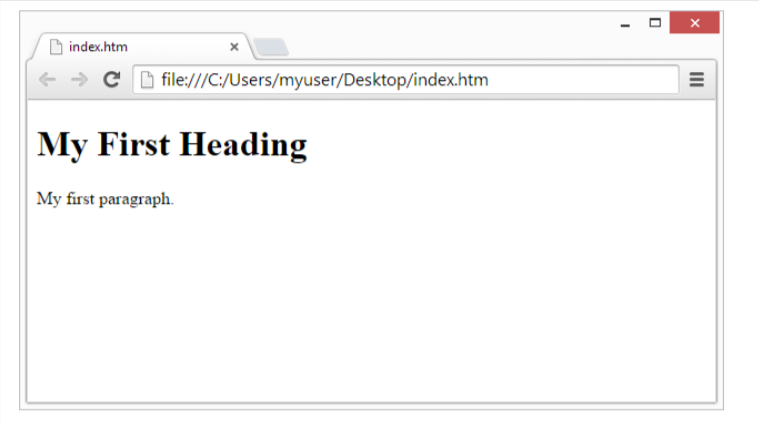
The purpose of a web browser (Chrome, Edge, Firefox, Safari) is to read HTML documents and display them correctly.

A browser does not display the HTML tags, but uses them to determine how to display the document:


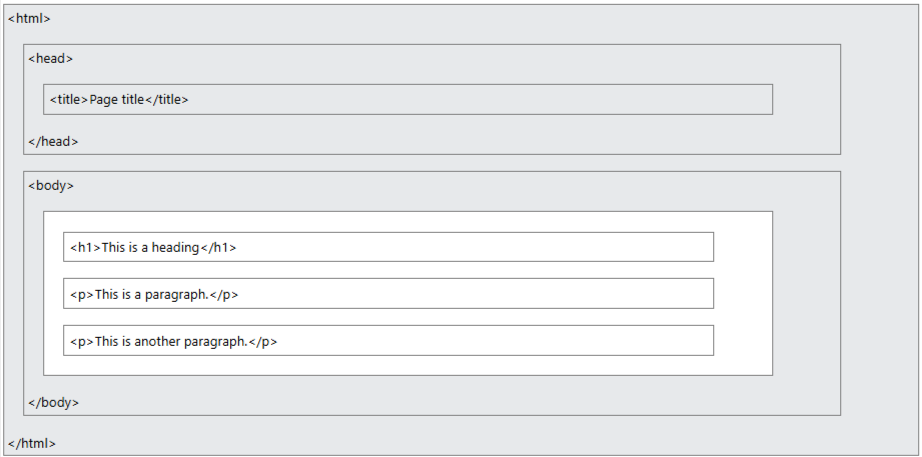
HTML Page Structure

Below is a visualization of an HTML page structure:


HTML History

Since the early days of the World Wide Web, there have been many versions of HTML:

Year Version
1989 Tim Berners-Lee invented www
1991 Tim Berners-Lee invented HTML
1993 Dave Raggett drafted HTML+
1995 HTML Working Group defined HTML 2.0
1997 Recommendation: HTML 3.2
1999 Recommendation: HTML 4.01
2000 Recommendation: XHTML 1.0
2008 WHATWG HTML5 First Public Draft
2012 WHATWG HTML5 Living Standard
2014 Recommendation: HTML5
2016 Candidate Recommendation: HTML 5.1
2017 Recommendation: HTML5.1 2nd Edition
2017 Recommendation: HTML5.2

Try It Your Self

Sign Up For New
Update

HTML Basic
  1. HTML Basic
  2. HTML Element
  3. HTML Attributes
  4. HTML Headings
  5. HTML Paragrapha
  6. HTML Tables
  7. HTML Lists
HTML Advance
  1. HTML Div
  2. HTML Classes
  3. HTML Id
  4. HTML Buttons
  5. HTML Iframes
  6. HTML Symbols
  7. HTML Emojis